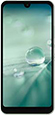
Aquos Wish eSIM Information
| eSIM Supported | ✓ Yes |
| SIM Type | eSIM + Nano-SIM |
| SIM Slots | 2 slots |
| Max eSIM Profiles | 8 profiles |
| Dual eSIM | ✓ eSIM Supported |
| Release Year | 2021 |
| Operating System | Android |
How to Check if Aquos Wish Supports eSIM
Not sure if Aquos Wish supports eSIM? Follow these steps.
Open the Settings app on your phone
Go to About phone and look for EID or eSIM
If you see an EID, your Aquos Wish supports eSIM
How to Set Up eSIM on Aquos Wish
Setting up eSIM on Aquos Wish is easy. Follow these steps.
Buy eSIM from a provider via app or website. Get QR code instantly.
Settings > Network & internet > SIMs > Add eSIM
Scan the QR code you received, or enter the code manually.
Set eSIM as primary or data SIM. Your Aquos Wish is ready to use.
❓ Frequently Asked Questions about Aquos Wish
How many eSIMs can Aquos Wish use?
Aquos Wish supports eSIM and can store up to 8 eSIM profiles. You can switch between them as needed.
Does Aquos Wish have a SIM tray?
Yes, Aquos Wish has a SIM tray for eSIM + Nano-SIM. It supports both physical SIM and eSIM.
How many SIMs can Aquos Wish use?
Aquos Wish supports 2 SIMs simultaneously (eSIM + Nano-SIM). Dual SIM is fully supported.
Can Aquos Wish use 2 SIMs at once?
Yes, Aquos Wish supports Dual SIM. You can use eSIM with a physical SIM, or use 2 eSIMs together.
What type of SIM does Aquos Wish use?
Aquos Wish supports eSIM + Nano-SIM. You can use either eSIM or physical SIM as preferred.
Which carriers support eSIM on Aquos Wish?
Aquos Wish works with eSIM from all major carriers, including travel eSIM providers for international use.
What if Aquos Wish doesn't read my SIM?
Try restarting your device. Check if the SIM is inserted correctly. For eSIM, go to Settings > Cellular and verify it's enabled, or try removing and reinstalling the eSIM.